Tampilkan postingan dengan label custom rom galaxy mini. Tampilkan semua postingan

Selasa, 26 Juni 2012

Tutorial CUSTOM ROM GT-S5570 Razr UI v6 for Galaxy Mini

CyanogenMod (CM) is a custom ROM that was no rival compare to the problem of UI and performance! Lightweight, Smooth, stable, and easy to customize. Custom ROM Rarzr Mini UI v6, a new variant of CM 7.2 for users of Galaxy Mini (GT-S5570), which looks similar to the customize Android Motorola Razr.

Thanks really for the developer: DQiB. so that my galaxy mini GT-S5570 can use this custom ROM

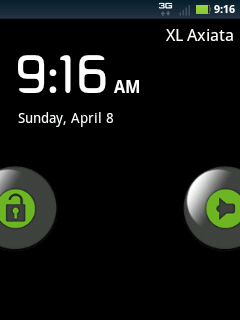
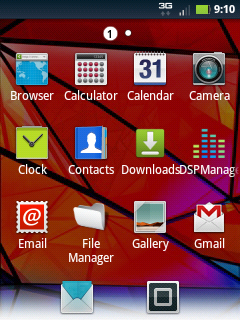
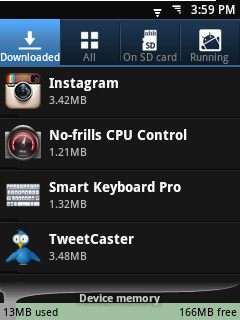
Screenshot :
custom rom gt-s5570 razr ui v 6 for galaxy mini

custom rom gt-s5570


lock screen(default)
gt-s5570 custom rom

Home Screen
custom rom gt-s5570 razr ui v 6 for galaxy mini

 downlaod custom rom for galaxy mini gt-s5570

notification bar

power option menu


Advantage:

- Display smooth (the Graphic looks amazing :D)

- There is a Menu Settings: Moto Razr UI Mods

- You Can Overclock it

- Deodexed (easy to make theming)

- Fast Response: runs like a Tigerrr! : D


Disadvantages:

- Wallpaper congenital fit aka not too big. Solution: set your own wallpaper (from Gallery).

- Extend the internal memory can not use A2SD S2E or script (yet find any way). Solution: use Link2SD. see tutorial iinstall link2sd .


Download Raxr UI V6 for galaxy mini here


How To Install: via ClockWorkMode (CWM)
The General Step is :

  1. Wipe Data / Reset
  2. Wipe Dalvik Cache
  3. Install RazrUI v6 (choose zip from sdcard)
  4. Wipe Data / Reset
  5. Reboot the system now


For the step by step installation galaxy mini gt-s5570 you can read in this post : tutorial custom rom for galaxy mini


Jumat, 01 Juni 2012

Custom Rom Chocobread v3.2 Final For Samsung Galaxy

hi there.. in this post today i want to share the latest Custom Rom from Chocobread. in this month chocobread v3.2 Finale Release was launched. there is many update in this v3.2 compared with the previous version. many bugs were fixed and some changelog update


here it is the change log Chocobread V3.2 Final Release
How To Install

changelog chocobread v3.2 final release

- and many more modification.


Screenshot :


Read First
Do with your own risk !!

Read Second
"Chocobread is a custom rom from the stock rom 2.3.x (Gingerbread), with many changes of customization, additional features and performance. Everyone can use, modify, and create your own rom using the kernel and the base of this rom (please include credits), I hope all the user more creativity and more advanced. "


Read Third
I recommend using S2E that created by darktremmor apps2sd. you can find here : Download Chocobread app2sd
Do you know what is app2sd? app2sd is apllication that used for transfer you application from your internal memory to you SDcard. because if you install a lot of application on your phone your memory will full and make your phone become slow.
So that we can use app2sd to transfer the installation file to your sdcard then you can acces it from your sdcard. but there is weakness. not of all appplication file can transfered to your sdcard. so, if you install very much apps it will still fulled your internal memory
To overcome it you must make partition to your SDcard so you can tottally transfer all of your apps file to your sdcard. for tutorial make partition on SDcard i will post it later. So please Stay Tune in tutorial for android


Installation Chocobread v3.2 tutorial :


Kamis, 17 Mei 2012

Tutorial Change Custom Rom For Galaxy Mini

Hello android lovers, good morning
at this blog of tutorial for android i will give complete tutorial for custom rom on galaxy mini. but before we start you must prepare all the files neede, download the files below:
download ODIN
download TASS_v1.0.ops
clockworkmod recovery


for custom rom that you'll use you can search it up in google, in this tutorial i will use emanon v6
the advantage:

- Screen off animation can be arranged and macem-macem effect, can be random as well
- if use for internet connection and gaming will more smooth
- Random cool bootanimation, there are 4 on it
- Which already include kernel support until 806MHz overclock, with No frills cpu control.
- If use DSP manager, the sound from headset will sounds more smooth
- FM radio work (Wah bgt same ane miss the mini FM radio)
- Notif Widget button bar can be replaced as desired
- Smoothly with a2sd darktremor
- the 3D Gallery is not slow like CM7
- can use radio
- Removed stock apps
- Google apps that can be downloaded from the Market (Gmail, Voice Search, Youtube, and Quick Search) to ensure that you get the latest version and to save space
- Samsung apps (Quick Office, Software Updater, Samsung Market, Stock Clock Widget, Program Monitor Widget, Screen Capture Service, Home Screen Tips, and Social Hub)
- Swype (optional to re-install)
• Replaced stock apps
- Myfiles ==> File Manager (with root access File Manager > Settings > Root Explorer)
- Dual Clock and Clock Widget ==> From Galaxy Y
- Desk Clock ==> From CM7
- Live Wallpaper ==> From CM7 (modified by me)
- TouchWiz Launcher ==> From SGS (modified by me)
- Maps ==> Updated to 6.3.0
- Market ==> Google Play
• Modified stock apps
- Messaging ==> Removed recipient limit and SMS>MMS auto-conversion. Enabled skin chooser
- Camera ==> Enabled power key to take pictures
- Wallpapers ==> Replaced some wallpapers
- FM Radio ==> Removed Airplane mode restriction

download emanon v6 here

before you use this custom rom your galaxy mini must have base firmware at gingerbread 2.3.X, see the tutorial upgrade to gingerbread 2.3.4 on galaxy mini


this is the tutorial

1.INSTALL CLOCKWORKMOD RECOVERY

  • extract all the file that you have download(use password:samsfirmware.com or sampro.pl if asked)
  • The first turn on reboot mini galaxy in download mode (hold power button + volume (-) + center button)
  • connect your galaxy mini to a PC via a USB
  • open Odin multi downloader be sure port mini galaxy detected
  • select the OPS file(tass_v1.0.ops)
  • checked option one package
    tutorial custom rom on galaxy mini
  • select the option file that we will flash in column one package(the file clockworkmod recovery that you have download)
  • press start and wait until the mini galaxy reboot and enter the home screen

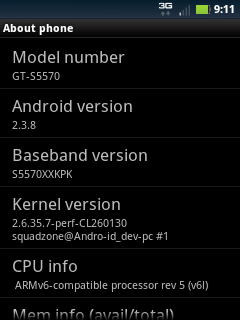
this is the screenshot of custom rom emanon V6
dowload custom rom emanon v6 for samsung

tutorial change custom rom for galaxy mini

dowload custom rom emanon v6


INSTALL CUSTOM ROM VIA CLOKWORKMOD

  • first make sure the file(emanon v6 that you have download) that will be installed already on the SD card root directory
  • restart / reboot in recovery mode mini galaxy (hold power button + the center button)
  • select "install zip from SD card"
  • select "choose zip from SD card" (here select a custom ROM that will be installed : your emanon v6)
  • select "YES - install update"
  • select "wipe the cache partition"
  • choose "wipe data - reset"
  • pilih "reboot system now" and wait until the mini galaxy into the home screen


FINSIH :))
now you will have custom rom emanon v6 on your lil'G
see you in next tutorial for android
Sabtu, 28 April 2012

What is custom ROM on android

Hi Every Body meet with me again here in Tutorial for android. do you know about android Mod? Android Mod is another name from Custom ROM Android is a file system of firmware for devices such as cell phones / mobile phones or tablet pc, which is based Android from operating system which is modified and customized as you wish (Custom Developer), by changing the original-official firmware (Stock ROM) device is the default vendor
what is custom rom android?
Custom Rom making purpose is to change or improve the feature of firmware from Android devices so that can improve your android phone's reliability and performance, performance in excess of what is already offered by its original firmware. Capability or ability that can be improved features is: Wi-Fi, Bluetooth, USB, Audio, Display, Reboot, Rooted, Network, 3G Modem, Easy Install Application-apps (. Apk) and others, even the Clock Over the Android processor!

What is Custom ROM?


ROM - Read Only Memory is a data storage (file system in this discussion) in the form of IC-Chip. So in general Custom Custom ROM or ROM can be interpreted in the form of a file system software, firmware (size / capacity in a kilobyte, megabyte) is located in ROM IC device (IC BIOS functions such as the Computer-arrange all the peripherals on the mainboard with the Kernel the main access) which is then modified so that more can be anything as you wish, of course, still based on the original firmware version / Stock ROM of the output device manufacturer or vendor. Technically Stock ROM file system in the taken-download by Custom Developer (third party) to modify them as you wish, then planted again keperangkat keperangkat or other support-match (one of them by flashing method).


The Advantages of Custom ROM Android:
  • There are many options to choose from Custom ROM for Android devices that can be downloaded for free. The type and range of Custom ROM sample was as follows: CyanogenMod, MIUI 2.3.3, FolioMod, Darky's Extreme Edition, ROM Kitchen, GingerReal, Turbo Ginger, GingerCriskelo, DebusROM, Juwe's Smart Edition, Serendipity, Ultimate, Tiramisu, 7Linux ROM, Simple Honey, JVP F1 Mod, hawkish 2, Thunder, Laila's ROM, Insanity, c0llal0-rel0ad3d, Filetrap TwoNights, Apanda ROM China (review Apanda), Foxconn Official ROM 2.2, Andro-ID apem ROM v1.0 (Indonesia), Android Bakpia 2.2.0 Nexian Journey (Indonesia) and others.
  • Latest version of the Custom ROM is updated frequently by each custom developer and later released as soon as it markets Android device.
  • Full support by the developers and contributors in the Forum Custom ROM related.
  • Performance improvement and optimization of the device, where the user or the user more leverage using their Android devices.
  • Maximize the use of an external SD memory card as a place to store application-apps. Usually for old mobile phones, which still has a small internal memory.
  • Some ROM-Custom firmware offers features that reduce battery waste. So the battery charge can be more economical.
  • There are several features that offer Custom ROM Over Clocking integrated, so that the access device applications more quickly.
  • Possibility for the root user or user-Rooted access to the device and makes it easier to install applications without Android Market (sideload apps-aftermarket).
fot more about custom ROM, and another android tutorial and how to custom Rom stay update in this blog.. see you next time :')

Minggu, 04 Juli 2010

Custom ROM For Galaxy Mini Chocobread v2.2

Hello every body .. now i want share tutorial custom rom for galaxy mini, it is my first custom rom in share about tutorial for android. And this time i share Chocobread mini v2.2 for galaxy that have actually been released long enough, yesterday I've managed to test by myself. made by the team chocodev one of them is my friend named Nizar and one college with me. Hopefully when when he wants to share his knowledge on how to create your own custom rom. you can just see how it looks below
galaxy mini custom rom

custom rom for galaxy mini

custom rom for galaxy mini

tutorial custom rom for galaxy mini

mini custom rom

android custom rom

tutorial custom rom


Chocobread is a custom rom for galaxy mini from the stock rom 2.3.x (Gingerbread), with many changes of customization, additional features and performance. Everyone can use, modify, and create your own rom using the kernel and the base of this rom

Advantages of chocobread custom rom:

  • There is abl Indonesian language in the search for a lot of people (in my country) haha: p
  • include a2sdGUI
    kernel-806mhz
  • Smooth and efficient batrenya
  • Based gingerbread 2.3.6
  • -New kernel 2.6.35.14 (21 Governor + 7 i/o scheduler, SFB, cgroups, support EXT,SWAP,FAT filesystem, Fix battery drain, Default SmartassV2 & SIO, TUN & CIFS compiled, Overclock up to 844mhz, UV (on progress)).
  • Toucwiz30Launcher with 5 dock, 5x3 app drawer, list mode, and enable landscape mode.
  • Scrolling cache and volume step.
  • 14 Statusbar toogle and battery bar.
  • Chocobread Parts.
  • Elegance Style Theme.
  • Old market.
  • Gapps updated (without maps and market).
  • Fix RTL and Multyread Fonts.
  • 9 Lockscreen (Settings->Display->Unlock screen).
  • 100% deodexed files.
  • Reboot, Recovery and Screenshot shortcut on Power Menu.
  • Adhoc wifi.
  • Data Monitor (Settings -> Wireless and networks -> Data monitor).
  • Pre-Rooted.
  • App2sd darktremor.
  • New apps : Droidvpn, Cifs Manager, RealCalc, File Manager, No-frills CPU, Superuser, Walkman, 2SDGUI, and Terminal.


how to install chocobread custom rom:
-base: 2.3.4
-must have installed clockworkmod recovery, see tutorial install clockworkmod recovery

-install a custom rom file through recovery mode, do not forget to wipe and cache the data well after finished install chocobread then wipe data and cache again
-if already completed select reboot system now

note:
-if there are problems please wipe the data n the new cache cr reinstall it.
-to activate the partition a2sdGUI please dlu micro sd mini galaxy, I recommend using ext2, create swap with size 50mb linux just do not need much

ok that for tutorial change custom rom galaxy mini to chocobread.. see you in next tutorial for android.