Minggu, 29 November 2009

Android Hello World Activity Sample

Here we are looking how to create a sample hello android program using eclipse IDE
1.Setup your Environment
2. Create an application

1. Setup Android Environment
a. Download latest Eclipse from http://eclipse.org/
b. update android Plug-in - Refer : http://about-android.blogspot.com/2009/11/about-android-first-of-all-android_09.html


c. Install Android SDK
Install new android SDK from the android site. Refer:http://about-android.blogspot.com/2009/11/about-android-first-of-all-android_09.html
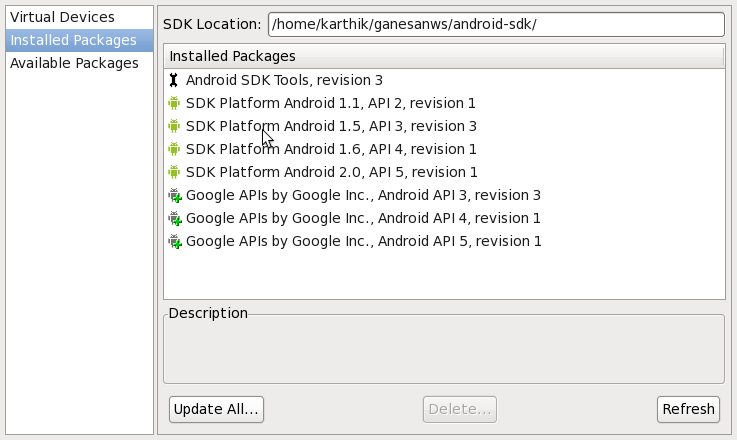

D. Configure SDK with your Eclipse
Go to Window>Preference>Select Android > Browse "SDK PATH" > Apply


E. Create a Device / Emulator
Create emulator using the AVD manager
Open AVD Manager > New > Give Name/Target > Create AVD.


Android Environment has setted. Now we can create an android Application.

2. Create a " Hello World Apps "
a. Open Eclipse > File > Android Project.
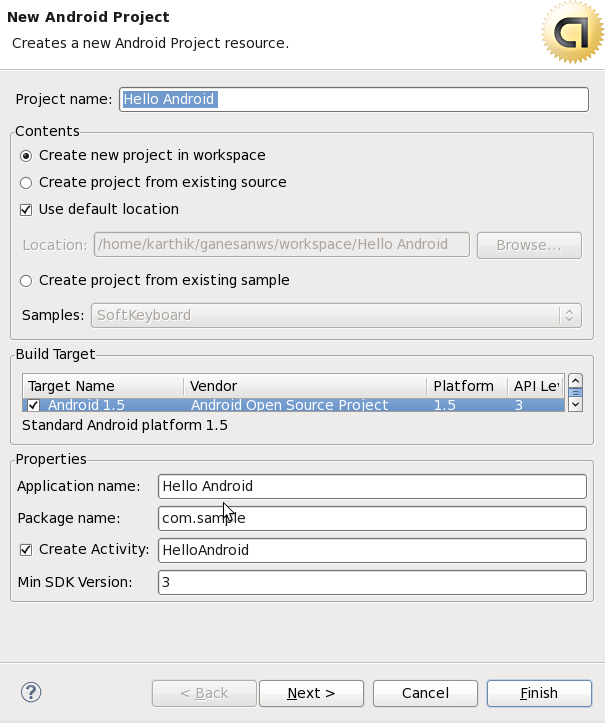

b. Check the Android Folder Structure.
Go to Window > Show View > package Explorer


AndroidManifest.xml - It contains the overall application configuration.
src - Contains the java code like activites,service,broadcast receiver , etc,.
res - Contains the application resource
          1. drawable - Icon,Image
          2. raw - Sounds
          3. menu - menu properties
          4. values - application properites like title,color value, dropdown values.
          5. layout - screen design
gen - Contains the R.java File which is used to map the resource and java src.

c. Run the application
Run > Run Android Application


 D. Check the Emulator


Hope this is useful for create a hello world program.

Sabtu, 21 November 2009

Application Fundamentals

Android applications are written in the Java programming language.
Android application archieve format is .apx
Each process has its own Java virtual machine (VM), so application code runs in isolation from the code of all other application
Android Application Components are Activites,Service,Broadcast receivers and Content providers

Activities
An application that has a visible UI is implemented with an activity. When a user selects an application from the home screen or application launcher, an activity is started.

Services
A service should be used for any application that needs to persist for a long time, such as a network monitor or update-checking application.

Content providers
You can think of content providers as a database server. A content provider's job is to manage access to persisted data, such as a SQLite database. If your application is very simple, you might not necessarily create a content provider. If you're building a larger application, or one that makes data available to multiple activities or applications, a content provider is the means of accessing your data.

Broadcast receivers
An Android application may be launched to process a element of data or respond to an event, such as the receipt of a text message.

AndroidManifest.xml - Configuration
An Android application, along with a file called AndroidManifest.xml, is deployed to a device.
AndroidManifest.xml contains the necessary configuration information to properly install it to the device. It includes the required class names and types of events the application is able to process, and the required permissions the application needs to run.

Project Folder Structure ;
1. src - It contain the java code
2. Resource - It contain the all resource with different floder
    drawable - Icon
    raw - Sounds
    menu - Menu
    values - Project Properties
    layout - User interface Screens
3. gen - It contains the R.java file. You could not edit R.java manually. This have been generated automatically by understanding resource files etc.
4. AndroidManifest -It contains the Project properties
5. Android lib.


The next topic discusses the "Hello Android" Program and layout.

Jumat, 20 November 2009

Architecture of Android

Architecture of Android :
1. Linux Kernal [ 2.6 Kernal - security, memory management, process management, network stack, and driver model]
2. Native Libraries [SQLite, WEBKit, OpenGL,..]
3. Runtime + Dalvik VM [.dex format, Lightweight VM, Efficient Dalvik Bytecode]
4. Application Framework [Activity Manager, Content Manager, Location Manager, ]
5. Application [ System Apps and Your Apps]


Linux Kernal
Android is based on the linux keral 2.6. From the Kernal 2.6 android using the hardward interaction layer
Android relies on Linux version 2.6 for core system services such as security, memory management, process management, network stack, and driver model. The kernel also acts as an abstraction layer between the hardware and the rest of the software stack.

Libraries
Android includes a set of C/C++ libraries used by various components of the Android system. These capabilities are exposed to developers through the Android application framework.

Android Runtime
Android includes a set of core libraries that provides most of the functionality available in the core libraries of the Java programming language.

Every Android application runs in its own process, with its own instance of the Dalvik virtual machine. Dalvik has been written so that a device can run multiple VMs efficiently. The Dalvik VM executes files in the Dalvik Executable (.dex) format which is optimized for minimal memory footprint. The VM is register-based, and runs classes compiled by a Java language compiler that have been transformed into the .dex format by the included "dx" tool.

The Dalvik VM relies on the Linux kernel for underlying functionality such as threading and low-level memory management.


Application Framework

Developers have full access to the same framework APIs used by the core applications. The application architecture is designed to simplify the reuse of components; any application can publish its capabilities and any other application may then make use of those capabilities (subject to security constraints enforced by the framework). This same mechanism allows components to be replaced by the user.

Underlying all applications is a set of services and systems, including:

* A rich and extensible set of Views that can be used to build an application, including lists, grids, text boxes, buttons, and even an embeddable web browser
* Content Providers that enable applications to access data from other applications (such as Contacts), or to share their own data
* A Resource Manager, providing access to non-code resources such as localized strings, graphics, and layout files
* A Notification Manager that enables all applications to display custom alerts in the status bar
* An Activity Manager that manages the lifecycle of applications and provides a common navigation backstack


Applications

Android will ship with a set of core applications including an email client, SMS program, calendar, maps, browser, contacts, and others. All applications are written using the Java programming language.

The next topic discusses the basic components and folder structure of android application.